
KK8 account guides
KK8 login, clearly explained.
Find the right sign-in route, understand your account details and work through common access problems before trying again.
Read the login guide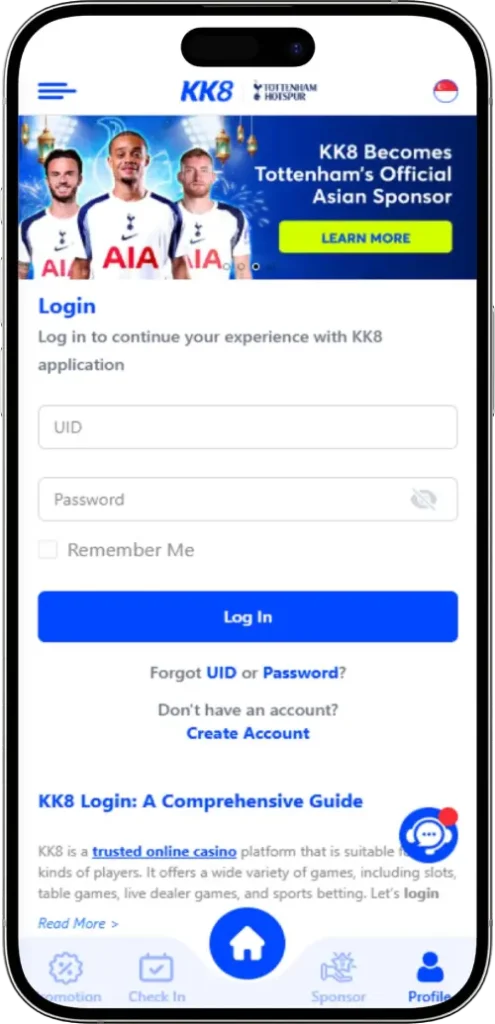
At a glance
- UID or registered email
- Password and access checks
- Mobile and desktop guidance
What you need for KK8 login
The KK8 login guide on kk8sg.cloud describes signing in with a UID (username) or email address and a password. Have the details associated with your existing account ready before opening the login form. A display name from a social profile may differ from the UID you registered.
If you have never created an account, follow the KK8 registration guide first. If you already have an account but cannot access it, work through the checks below rather than creating another one. A new registration does not recover an existing profile.
This page explains the process and does not collect credentials. Enter personal details only after checking the destination in your browser. The source screenshots are references to the interface; button placement and available sign-in options can change.
How to sign in to your KK8 account
- Open the platform and locate Login. The source guide points to kk8seo.com. Review the full address before proceeding. Look for the Login label because its position may differ between mobile and desktop layouts.
- Enter your account identifier. Use your UID or registered email, following the label on the current form. Check spelling and any extra spaces introduced by copying and pasting.
- Enter your password and submit once. Check the keyboard language and capital letters. If the form provides a password visibility control, use it only where nobody else can see your screen.
- Check the account shown. After access succeeds, confirm that the profile belongs to you before making changes. If it is unfamiliar, sign out and check whether the browser filled details for another account.
Wait for the result of one attempt before submitting again. A slow response does not tell you whether the password was accepted. Read any message shown instead of assuming that every failed attempt has the same cause.
Match the login problem to the next check
Start with what the screen actually says. The table below is a troubleshooting checklist, not a list of confirmed KK8 error messages. It separates account-detail problems from browser or connection problems.
| What you notice | What to check |
|---|---|
| The identifier is rejected | Compare the UID or email with the details used at registration. Avoid guessing several different accounts. |
| The password is rejected | Check case, keyboard language and saved credentials. Use the recovery option shown by the platform if you cannot remember it. |
| The form does not respond | Check your connection and whether other pages load. Refresh once, then try a current browser if the issue continues. |
| A restriction or verification message appears | Read the instructions and contact account support if needed. Repeated attempts do not resolve an account restriction. |
Before clearing browser data, make sure you know your account details. Clearing cookies may end an existing session. Do not disable browser security protections simply to force a page to load.
KK8 login on a phone or computer
The source describes Login on both mobile and desktop. On a small screen, scroll back to the main navigation or open its menu if the label is not visible. A saved home-screen shortcut can open a website without showing the same browser controls you see on a computer.
For mobile access, the KK8 app guide explains the Android, App Store and H5 Web labels shown on the source site. Check the current download route before installing anything. A browser session and an app session may present different layouts; that alone does not mean you need another account.
When switching devices, use your own device where possible. Avoid saving passwords on a shared computer. After you finish, use the account's sign-out control rather than only closing the tab.
Forgotten details and account support
If you have forgotten your password, look for the recovery option available on the current login screen. Follow that process and check which registered contact method it requires. The source homepage does not document a complete reset flow, so this guide does not promise a particular button, verification method or recovery time.
The source lists platform live chat as a support route. Open help from the platform you have checked, and explain the problem using the exact message, approximate time, device and browser. This gives support useful context without exposing your password.
If you share a screenshot, hide passwords, verification codes and unrelated personal information. Do not post account details in a public comment or social group. A support conversation should help identify the access issue; it should not require publishing private credentials.
What to check after you get access
Review the profile details and any account notices before continuing. If information has changed unexpectedly, stop and use the platform's support route. Keep a record of the issue without retaining exposed passwords or codes.
Signing in does not establish eligibility for an offer. Read the KK8 promotion terms guide for qualifying amounts, expiry dates and turnover conditions. For game information, the KK8 slots guide explains provider choices and the difference between game features and promotional rules.
Decide how much time you intend to spend before starting, and sign out when you finish. If you are returning only to solve an account problem, complete that task first rather than treating successful access as a reason to start playing.
KK8 login questions
Can I use my email for KK8 login?
The source guide lists UID (username) or email plus a password. Use the email associated with your account and follow the options shown on the current login form.
Should I register again if KK8 login fails?
Work through the access checks and recovery route for your existing account first. Registering again does not recover that account or resolve a restriction on it.
Does this page sign me in to KK8?
No. KK8SG Online provides a guide and related information. It does not collect your password, verify an account or carry out account recovery.
What information helps support investigate a login issue?
Provide the exact error wording, approximate time, device and browser through the platform support channel. Hide passwords, verification codes and unrelated personal details in screenshots.
About this guide
This KK8 SG Online guide combines the public instructions and images on kk8sg.cloud with practical account and device checks. It is an informational guide; account services take place on the platform. Interface labels, availability and terms can change. Check the current screen before continuing.